Posts

....
Technical Blog for .NET Developers ©

Monday, January 2, 2017

MVC4 Ajax Forms

ASP.NET MVC 4 includes Ajax functionalities based on jQuery javascript library. Most of the Ajax features in the framework build on or extend features in jQuery

In this post we will implement an asynchronous request form with validation

This is the Chemical model in our Application

 
    public class ChemicalElement
    {
        public int IdElement { get; set; }

        [DisplayName("Name")]
        [Required]
        public string Name { get; set; }

        [DisplayName("Latin name")]
        [Required]
        public string LatinName { get; set; }

        [DisplayName("Symbol")]
        [Required]
        [RegularExpression(@"\b[a-zA-Z]{1,3}\b")]
        public string Symbol { get; set; }
    }


We have imported the next SQL schema (table and stored procedure)


The code to release the search of chemical elements is the next


    public PartialViewResult SearchChemicalElements(string search)
    {
        var elementsModel = SearchElementsModel(search);

        return PartialView("Elements", elementsModel);
    }

    private IEnumerable<ChemicalElement> SearchElementsModel(string search)
    {
        var allElements = Elements.SearchElements(search);

        return allElements;
    }


And in the Elements class the implementation of the SearchElement method is this

   
	public static IEnumerable<ChemicalElement> SearchElements(string search)
    {
        using (CHEMICALSEntities context = new CHEMICALSEntities())
        {
            ObjectResult<SearchElementsBySymbol_Result> matchElements =
                context.SearchElementsBySymbol("%" + search + "%");

            foreach (var element in matchElements)
                yield return new ChemicalElement()
                {
                    IdElement = element.IdElement,
                    Name = element.Name,
                    LatinName = element.LatinName,
                    Symbol = element.Symbol
                };
        }
    }


The code in the View to make the process work asynchronously, is the next


@using (Ajax.BeginForm("SearchChemicalElements", "Chemical", new AjaxOptions
    {
        InsertionMode = InsertionMode.Replace,
        HttpMethod = "GET",
        LoadingElementId = "preloader",
        UpdateTargetId = "searchResults",
    }))


This code renders an html form with the next marks


The information about how to perform the AJAX request is contained in the DOM, and it is released by the jquery.unobtrusive-ajax.js code

The PartialView for Elements is strongly typed and renders a table in a loop for each element


The validation rules are specified in the model, so the code in the view

 
@Html.TextBoxFor(m => m.Symbol, new { Name = "search"})


will renders the information into these data dash attributes


data-val="true" 
data-val-regex="The field Symbol must match the regular expression '\b[a-zA-Z]{1,3}\b'." 
data-val-regex-pattern="\b[a-zA-Z]{1,3}\b" 
data-val-required="The field Symbol is required." 
id="Symbol" name="search"


The Ajax request, and validation are implemented inside the jQuery scripts

  
  @section scripts {
    <script type="text/javascript" src="~/Scripts/jquery.unobtrusive-ajax.min.js"></script>
    <script type="text/javascript" src="~/Scripts/jquery.validate.min.js"></script>
    <script type="text/javascript" src="~/Scripts/jquery.validate.unobtrusive.min.js"></script>
}    


Thursday, April 28, 2016

Dynamic Types: Indexers

When we are using Indexers in order to access our variables, we can expand the property through a dynamic reference of the accessed variable, we achieve this through ExpandoObject of System.Dynamic namespace

In this example we set values in a Dictionary type variable, and expand the property name on a dynamic variable


            dynamic Values = new ExpandoObject();

            var _Values = Values as IDictionary<string, object>;

            _Values["Name"] = "Little Writer";
            _Values["Weight"] = 1550.0M;

            string name = Values.Name;
            decimal weight = Values.Weight;


Thursday, February 4, 2016

HTML5 API Indexed Database

API Indexed Database is the officially supported by W3C way for the creation of databases with HTML5

This system takes the concept of key/value pairs to store data. the Database can contain Stores, the equivalent to the SQL tables, and each Object Store contains key/value pairs; this API is not a relational database, but object oriented. you can query this database inline as offline

The first step in this example will be creating a new database, for this we use the open() method, the syntax is as follows:
 
    indexedDB.open("database_name", version)    
    
    
If the database does not exist, it is created, else, it is open. The call to the open() function returns an IDBOpenDBRequest object with a result (success) or error value that you handle as an event

In this example we build the next web form, and implement a Web Method in the server side which returns an array of json objects for loading the database


The js code to open the database and create the object store is the next


    var HTML5DB = {};
    HTML5DB.indexedDB = {};
    HTML5DB.indexedDB.db = null;

    window.indexedDB = window.indexedDB || window.mozIndexedDB || 
                       window.webkitIndexedDB || window.msIndexedDB;
    window.IDBTransaction = window.IDBTransaction || window.webkitIDBTransaction || 
                            window.msIDBTransaction;
    window.IDBKeyRange = window.IDBKeyRange || window.webkitIDBKeyRange || 
                         window.msIDBKeyRange;

    HTML5DB.indexedDB.onerror = function (e) { console.log(e); };

    HTML5DB.indexedDB.open = function () {

        var version = 1;
        var request = window.indexedDB.open("db_example", version);

        request.onupgradeneeded = function (e) {

            var db = e.target.result;
            e.target.transaction.onerror = HTML5DB.indexedDB.onerror;
            var store = db.createObjectStore("object_store", 
                { keyPath: "id", autoIncrement: true });
        };

        request.onsuccess = function (e) {
            HTML5DB.indexedDB.db = e.target.result;
            HTML5DB.indexedDB.getAllRecords();
        };

        request.onerror = HTML5DB.indexedDB.onerror;
    };


The code to add and delete records is the next:

Since the id has been declared autoIncrement, we are inserting a record initializing two fields in the value property (value, and timeStamp)


    HTML5DB.indexedDB.addRecord = function (value) {

        var db = HTML5DB.indexedDB.db;
        var trans = db.transaction(["object_store"], "readwrite");
        var store = trans.objectStore("object_store");

        var data = {
            "value": value,
            "timeStamp": new Date($.now()).toLocaleTimeString()
        };

        var request = store.put(data);

        request.onsuccess = function (e) {
            HTML5DB.indexedDB.getAllRecords();
        };

        request.onerror = function (e) {
            console.log("Error Adding: ", e);
        };
    };

    HTML5DB.indexedDB.deleteRecord = function(id) {
      var db = HTML5DB.indexedDB.db;
      var trans = db.transaction(["object_store"], "readwrite");
      var store = trans.objectStore("object_store");

      var request = store.delete(id);

      request.onsuccess = function(e) {
        HTML5DB.indexedDB.getAllRecords();
      };

      request.onerror = function(e) {
        console.log("Error deleting: ", e);
      };
    };


The next is the code to retrieve and render records from the database:


    HTML5DB.indexedDB.getAllRecords = function() {

      $('#dbRecords tr').remove();

      var db = HTML5DB.indexedDB.db;
      var trans = db.transaction(["object_store"], "readwrite");
      var store = trans.objectStore("object_store");

      var keyRange = IDBKeyRange.lowerBound(0);
      var cursorRequest = store.openCursor(keyRange);

      cursorRequest.onsuccess = function(e) {
        var result = e.target.result;
        if(!!result == false)
          return;

        renderRecord(result.value);
        result.continue();
      };

      cursorRequest.onerror = HTML5DB.indexedDB.onerror;
    };

    function renderRecord(record) {

        $("#dbRecords").find('tbody')
            .append($('<tr>')
                .append($('<td>')
                    .append($('<span>')
                        .html(record.value)
                    )
                )
                .append($('<td>')
                    .append($('<span>')
                        .html(record.timeStamp)
                    )
                )
                .append($('<td>')
                    .append($('<a>')
                        .attr('href', 
                              'javascript:HTML5DB.indexedDB.deleteRecord(' + record.id + ')')
                        .html('Delete')
                )
            ));
    }


Here is the result of this code in the client side:


Finally we have implemented this call to the server to retrieve a collection of json objects and preload the database:

 
    function getData() {

        $.ajax({
            url: "application.aspx/getData",
            type: "POST",
            data: {},
            contentType: "application/json; charset=utf-8",
            dataType: "json",
            success: function (json) {

                var records = json.d.Data.records;

                for (var i = 0; i < records.length; i++) {

                    HTML5DB.indexedDB.addRecord(records[i].Data.value);
                }
            },
            error: function (e) {
                alert('ERROR: ' + e.status + ' : ' + e.statusText);
            }
        });
    }


    [WebMethod]
    [ScriptMethod(ResponseFormat = ResponseFormat.Json)]
    public static JsonResult getData()
    {
        List<JsonResult> recordSet = new List<JsonResult>();

        for (int i = 0; i < 10; i++)
        {
            Record rec = new Record();
            rec.value = "record " + i.ToString();
            recordSet.Add(new JsonResult() { Data = rec });
        }

        JsonResult result = new JsonResult();
        result.Data = new Result() { records = recordSet };
        return result;
    }

    private class Result
    {
        public List<JsonResult> records;
    }

    private class Record
    {
        public string value;
    }


<METHOD SOFTWARE © 2014>

Sunday, January 24, 2016

Windows Services

Windows Services are applications that run in the background, performing diverse tasks and designed not to require user intervention

In this example, we are going to deploy a Windows Service which detects changes on a .txt file and will take its data to a database

The first step is begin a Windows Service Project


The code template of the Windows Service is as follows


namespace WSWatcher
{
    public partial class Service1 : ServiceBase
    {
        public SWatcher()
        {
            InitializeComponent();
        }

        protected override void OnStart(string[] args)
        {
        }

        protected override void OnStop()
        {
        }
    }
}


Now we add a .config file with the path of the archive to watch, and the connection string to the database

<?xml version="1.0" encoding="utf-8" ?>
<configuration>
  <appSettings>
    <add key="file_path" value="C:\ExampleData" />
  </appSettings>
  <connectionStrings>
    <add name="conSet" providerName="System.Data.SqlClient" 
         connectionString="Data Source=***; Initial Catalog=PRODUCTS; User=***; Pwd=***"/>
  </connectionStrings>
</configuration>


We add the FileSystemWatcher class to our code, and implement handlers for Created and Changed Events


protected override void OnStart(string[] args)
{
    fileWatcher = new FileSystemWatcher(ConfigurationManager.AppSettings["file_path"]);
    fileWatcher.Filter = "*.txt";
    fileWatcher.EnableRaisingEvents = true;
    fileWatcher.Changed += new FileSystemEventHandler(fileWatcher_Changed);
    fileWatcher.Created += new FileSystemEventHandler(fileWatcher_Created);
}

void fileWatcher_Created(object sender, FileSystemEventArgs e)
{
    bulkData(e.ChangeType);
}

void fileWatcher_Changed(object sender, FileSystemEventArgs e)
{
    bulkData(e.ChangeType);
}

void bulkData(WatcherChangeTypes changeType)
{
    string[] lines = System.IO.File.ReadAllLines(fileWatcher.Path + "\\data.txt");

    using (SqlConnection connection = 
    new SqlConnection(ConfigurationManager.ConnectionStrings["conSet"].ConnectionString))
    {
        connection.Open();
        foreach (string line in lines)
        {
            SqlCommand comm = connection.CreateCommand();
            comm.CommandType = CommandType.StoredProcedure;
            comm.CommandText = changeType == WatcherChangeTypes.Created
                ? "INSERT_PRODUCT"
                : "UPDATE_PRODUCT";
            comm.Parameters.Add(new SqlParameter("@idproduct", 
                Convert.ToInt32(line.Split('-')[0])));
            comm.Parameters.Add(new SqlParameter("@pname", line.Split('-')[1]));
            comm.ExecuteNonQuery();
        }
    }
}


It's time to create the installer for the service, right click on the service designer and add a new installer


Select serviceInstaller1 on the designer, and make sure the ServiceName property is set to SWatcher

Now click serviceProcessInstaller1 and set the Account property to LocalSystem. This will cause the service to be installed and to run on a local service account.

To build your project, before set the Startup object to point to your service. In Project Properties, on the Application page, from the Startup object list, click SWatcher.Program


Now build the solution, run Developer Command Prompt as Administrator, navigate to your bin folder, and type the command for installing the service

installutil.exe SWatcher.exe


Check the Service in the Control Panel, with the configuration specified in development, LocalSystem Account

Now we test the service, creating a file with the next data


The result is immediately appreciated

A change in the file will produces the next result


<METHOD SOFTWARE © 2012>

Friday, December 26, 2014

Extension Methods

Extension methods are static methods, in static classes, marked up to be added to existing types without creating a new derived type, or modifying the original type. You can use extension methods to extend a class or interface. This feature was introduced in C# 3.0

In this example we will implement extension methods for two different data types: DateTime, and IEnumerable

This is the implementation of the methods in this example

 
    public static class ExtensionMethods
    {
        public static string ToLetterFormat(this DateTime dateTime)
        {
            return dateTime.ToString("MMMM d',' yyyy");
        }

        public static IEnumerable<string> GetOnlyStrings<T>(this IEnumerable<T> list)
        {
            foreach (var item in list)
            {
                if (item is string)
                    yield return item as string;
            }
        }
    }


The markup that makes these extension methods is the keyword this used before the first parameter in the parameter list of the method. This keyword is specific to C#, and it instructs the compiler to add the ExtensionMethodAttribute to the method

The first method produces a result like this:

  
    string letterFormatDate = (DateTime.Today).ToLetterFormat();

    Console.WriteLine(letterFormatDate);
    Console.ReadKey();


The second method produces this result:


    customList.ForEach(l => Console.WriteLine(l.GetType().ToString()));
    Console.ReadKey();

    List<string> allStringsFromCustomList = customList.GetOnlyStrings().ToList();

    Console.WriteLine(Environment.NewLine);

    allStringsFromCustomList.ForEach(s => Console.WriteLine(s));

    Console.ReadKey();


<METHOD SOFTWARE © 2014>

Sunday, September 14, 2014

Entity Framework Change Tracker

With ChangeTracker we can track the state of the entities in the database context, so when our processes work into a context we can work on specific group of entities

In this example we have this diagram and a class which handles the retrieve and insert methods. This is the implementation:


        public IEnumerable<GALAXIES> GetKnownGalaxies()
        {
            return (from GALAXIES galaxies in _context.GALAXIES select galaxies);
        }

        public void InsertGalaxy(GALAXIES galaxy)
        {
            _context.GALAXIES.Attach(galaxy);
            _context.Entry(galaxy).State = EntityState.Added;
            _context.GALAXIES.Add(galaxy);
        }


Now we add a third method to retrieve only the added galaxies:

     
        public IEnumerable<GALAXIES> GetNewGalaxies()
        {
            return
                (from GALAXIES galaxies in _context.ChangeTracker.Entries()
                     .Where(e => e is GALAXIES && e.State == EntityState.Added)
                     .Select(e => e.Entity as GALAXIES)
                 select galaxies);
        }

        public void InsertNewGalaxy()
        {
            GALAXIES newGalaxy = new GALAXIES()
                {
                    Name = "Cartwheel Galaxy",
                    Distance = (decimal)1.5,
                    Magnitude = (decimal)2.9
                };

            galaxyClass.InsertGalaxy(newGalaxy);
        }


The result of the program with this sequence is the next:

     
        var knownGalaxies = galaxyClass.GetKnownGalaxies().ToList();

        knownGalaxies.ForEach(
            x =>
            Console.WriteLine("{0}: {1} distance, {2} magnitude", 
                                x.Name, x.Distance.ToString(),
                                x.Magnitude.ToString()));

        Console.WriteLine(Environment.NewLine);
        Console.ReadKey();

        InsertNewGalaxy();

        var newGalaxies = galaxyClass.GetNewGalaxies().ToList();

        newGalaxies.ForEach(
            x =>
            Console.WriteLine("{0}: {1} distance, {2} magnitude", 
                                x.Name, x.Distance.ToString(),
                                x.Magnitude.ToString()));


<METHOD SOFTWARE © 2014>

Sunday, April 20, 2014

LINQ Compiled Queries

The process of converting LINQ queries to SQL statements, involves syntax check, and the construction of the SQL query, this task is performed every time we launch the LINQ query

In compiled queries, the syntax check and construction plan are cached in a static class, so LINQ uses this cached plan from the static class object instead of re-building it in sequent executions

In this example we have the next diagram of LINQ to SQL Classes


We will compile these two queries. A compiled query is stored in a Func delegate, where the first argument must be an instance of DataContext (or derived), and the last argument must be the type returned from the query, you can define up to three arguments in the middle as parameters of the compiled query. You will need to specify these arguments for each compiled query invocation

 
        private static Func<BusinessClassesDataContext, DateTime, IQueryable<B_SALES>>
            SalesByDate = CompiledQuery.Compile(
                (BusinessClassesDataContext ctx, DateTime saleDate) =>
                    (from sl in ctx.GetTable<B_SALES>()
                     where sl.SALEDATE >= saleDate
                     select sl));

        private static Func<BusinessClassesDataContext, int, Decimal>
            SalesAverageByCustomer = CompiledQuery.Compile(
                (BusinessClassesDataContext ctx, int idCustomer) =>
                    (from sl in ctx.B_SALES
                     where sl.B_CUSTOMERS.IdCustomer == idCustomer
                     group sl by sl.Price
                     into sales
                     select sales.Average(sl => sl.Price)).First());


Now the code calling these queries is the next

 
        using (BusinessClassesDataContext context = new BusinessClassesDataContext())
        {
            foreach (B_SALES sale in SalesByDate(context, saleDate))
            {
                Console.WriteLine("{0} : {1}", sale.IdSale, sale.IdProduct);
            }

            Console.WriteLine("{0:N2}$", SalesAverageByCustomer(context, 1));
        }            


<METHOD SOFTWARE © 2014>

Sunday, February 2, 2014

LINQ Group Operations

In this post we will make a review of the main grouping operations applied with LINQ

The first step will be adding our diagram of LINQ to SQL Classes


For the sake of simplicity, we will program the function LoadContext, which we will call once and will preload data in typed lists

  
    static void LoadContext()
    {
        using (BusinessDataContext businessCtx = new BusinessDataContext())
        {
            customers = (from cst in businessCtx.B_CUSTOMERs
                            select cst).ToList<B_CUSTOMER>();

            products = (from prd in businessCtx.B_PRODUCTs
                        select prd).ToList<B_PRODUCT>();

            providers = (from prv in businessCtx.B_PROVIDERs
                            select prv).ToList<B_PROVIDER>();

            providers_products = (from prv_prd in businessCtx.B_PROVIDERS_PRODUCTs
                                    select prv_prd).ToList<B_PROVIDERS_PRODUCT>();

            sales = (from sls in businessCtx.B_SALEs
                        select sls).ToList<B_SALE>();
        }
    }


The next method will make an average of sales grouped by customers, and grouped by products in the second case

  
    static void getAvgSales()
    {
        var avgSalesByCustomer = 
            (from s in sales
                join c in customers
                on s.IdCustomer equals c.IdCustomer
                group s by new { c.FirstName, c.LastName } into cust
                orderby cust.Key.FirstName
                select new
                {
                    Customer = cust.Key.FirstName + " " + cust.Key.LastName,
                    CountSales = cust.Count(),
                    AvgSales = cust.Average(sl => sl.Price)
                });


        var avgSalesByProduct = 
            (from s in sales
                join p in products
                on s.IdProduct equals p.IdProduct
                group s by new { p.Description } into product
                orderby product.Key.Description
                select new
                {
                    Product = product.Key.Description,
                    CountSales = product.Count(),         
                    CountUnits = product.Sum(sl => sl.Cuantity),
                    AvgSales = product.Average(sl => sl.Price)
                });
            
        Console.WriteLine("\n\nAVERAGE BY CUSTOMER\n\n");
        foreach (var avgSale in avgSalesByCustomer)
            Console.WriteLine("{0} : {1} purchases : {2}$", avgSale.Customer, 
                avgSale.CountSales, string.Format("{0:N2}", avgSale.AvgSales));

        Console.WriteLine("\n\nAVERAGE BY PRODUCT\n\n");
        foreach (var avgSale in avgSalesByProduct)
            Console.WriteLine("{0} : {1} sales : {2} units : {3}$", avgSale.Product, 
                avgSale.CountSales, avgSale.CountUnits, string.Format("{0:N2}", 
                avgSale.AvgSales));
    }


The output is as follows


The next method will extract sales data grouped by product and the different periods of sale date
  
    static void getSalesByDate()
    {
        var salesByPeriod = 
            (from s in sales
                group s by new 
                { s.B_PRODUCT.Description, s.SaleDate} into grp
                orderby grp.Key.SaleDate, grp.Key.Description
                select new
                {
                    Date = grp.Key.SaleDate.Value.ToString("MM/yyyy"),
                    Product = grp.Key.Description,
                    CountSales = grp.Count(),
                    CountUnits = grp.Sum(sl => sl.Cuantity),
                    AvgSales = grp.Average(sl => sl.Price)
                });

        Console.WriteLine("\n\nAVERAGE BY DATE PERIOD\n\n");
        foreach (string date in salesByPeriod.Select(s => s.Date).Distinct())
        {
            Console.WriteLine(date);
            foreach (var sale in salesByPeriod.Where(s => s.Date == date))
                Console.WriteLine("-- {0} : {1} sales : {2} units : {3}$",
                    sale.Product, sale.CountSales, sale.CountUnits, 
                    string.Format("{0:N2}", sale.AvgSales));
        }
    }


Notice that in this occasion, we don't have performed the join to the product set, instead, we have used the access property to the set of products from the set of sales
The result is the next


We can also use lambda syntax in order to release more group operations, such as max or min

  
    static void getSalesByDate()
    {
        var salesByPeriod = 
            (from s in sales
                group s by new 
                { s.B_PRODUCT.Description, s.SaleDate} into grp
                orderby grp.Key.SaleDate, grp.Key.Description
                select new
                {
                    Date = grp.Key.SaleDate.Value.ToString("MM/yyyy"),
                    Product = grp.Key.Description,
                    CountSales = grp.Count(),
                    CountUnits = grp.Sum(sl => sl.Cuantity),
                    AvgSales = grp.Average(sl => sl.Price)
                });


        var maxSalesDate = (from sl in salesByPeriod select sl)
            .Where(sl => sl.AvgSales == salesByPeriod.Max(sld => sld.AvgSales));

        Console.WriteLine(maxSalesDate.First());
    }


The result is this


<METHOD SOFTWARE © 2014>

Thursday, November 28, 2013

Bulk eMail

When we are designing processes for sending bulk emails, we have to keep in mind anti-spam filters and its different policies

These are some of the key points to avoid our sent emails going into the spam folder:
- Launch the process from a server with a consistent IP address
- Keep valid reverse DNS records for the IP address(es) from which you send mail, pointing to your domain
- Add headers to identify the precedence of the email as bulk
- Provide a service to the end user can cancel the subscription
- Send emails one by one instead of collecting all recipients in the To property

You can find more information here (Google Bulk Senders Guidelines), and here (Tips for avoiding spam filters)

The code for sending emails repetitively with these specifications is the next

 
    private void sendEmails(List<emailToSend> emailsToSendList)
    {
        string _sender = ConfigurationManager.AppSettings["sender"];
        string _host = ConfigurationManager.AppSettings["host"];
        string _pswd = ConfigurationManager.AppSettings["pswd"];
        string _port = ConfigurationManager.AppSettings["port"];

        foreach (eMailToSend email in emailsToSendList) {

            try 
            {        
                System.Net.Mail.MailMessage mail = new System.Net.Mail.MailMessage();

                mail.From = new MailAddress("no-reply@yourdomain.com", "no reply");

                mail.To.Add(email.Address);
                mail.Subject = "bulk campaign";

                mail.Body = email.HTMLBody;

                mail.BodyEncoding = System.Text.Encoding.UTF8;
                mail.IsBodyHtml = true;

                mail.Headers.Add("Precedence", "bulk");
                mail.Headers.Add("Message-Id", string.Concat("<", 
                                 DateAndTime.Now.ToString("yyMMdd"), ".", 
                                 DateAndTime.Now.ToString("HHmmss"), "@yourdomain.com>"));

                mail.Priority = MailPriority.Low;

                SmtpClient mailClient = new SmtpClient();

                NetworkCredential basicAuthenticationInfo = 
                        new NetworkCredential(_sender, _pswd);
                mailClient.Credentials = basicAuthenticationInfo;
                mailClient.Port = _port;
                mailClient.Host = _host;

                mailClient.Send(mail);
            } 
            catch (Exception ex) 
            {
                logError(ex.Message + " >> " + ex.StackTrace);

                continue;
            }
        }
    }


<METHOD SOFTWARE © 2013>

Monday, September 30, 2013

WCF Enable SSL

In order to include HTTPS binding to our REST Services in IIS, we have to set up the service to accept SSL Certificates

We must have installed the Certificate on IIS


Browse to the WCF Rest Service Application, click on SSL Configuration, and set up the service to accept client certificates


Now our service works under HTTPS binding, to enable both protocols, we must write two different endpoints referring the service, and stablish the behavior configuration for http and https

     
    <behavior name="ServiceBehavior">
       <serviceMetadata httpGetEnabled="true" httpsGetEnabled="true"/>
         <serviceDebug includeExceptionDetailInFaults="false"/>
    </behavior>      
    
    <%--...--%>
    
    <bindings>
      <webHttpBinding>
        <binding name="BindHttp" crossDomainScriptAccessEnabled="true">
        </binding>      
        <binding name="BindHttps" crossDomainScriptAccessEnabled="true">
            <security mode="Transport" />
        </binding>
      </webHttpBinding>
    </bindings>
    
    <%--...--%>
    
    <services>
      <service behaviorConfiguration="ServiceBehavior" name="WCFRestService.RestService">
        <endpoint address="" behaviorConfiguration="web" binding="webHttpBinding"
          bindingConfiguration="BindHttp" contract="WCFRestService.IRestService" />      
        <endpoint address="" behaviorConfiguration="web" binding="webHttpBinding"
          bindingConfiguration="BindHttps" contract="WCFRestService.IRestService" />          
      </service>
    </services>


<METHOD SOFTWARE ©>

Wednesday, July 24, 2013

WCF Rest Services

When we are designing processes which expose data across multi-platform and systems, we have to consider the implementation of REST Services

REST stands for Representational State Transfer. In RESTful systems, servers expose resources using a URI, and clients access these resources using the four HTTP verbs
GET: used exclusively to retrieve data

DELETE: used for deleting resources

PUT: used to add or change a resource

POST: used to modify and update a resource
In this example, we will develop a REST Service with Xml and Json responses, using WCF, and will make the whole circuit to the call

The first step is beginning a new WCF Application. This is the implementation of the interface with the definition of the service contract

 
	namespace RestWCFService
    {
        [ServiceContract]
        public interface IRestService
        {
            [OperationContract]
            [WebInvoke(Method = "GET", ResponseFormat = WebMessageFormat.Xml,
                BodyStyle = WebMessageBodyStyle.Wrapped, UriTemplate = "getXml/{id}")]
            string XmlElement(string id);

            [OperationContract]
            [WebInvoke(Method = "GET", ResponseFormat = WebMessageFormat.Json,
                BodyStyle = WebMessageBodyStyle.Wrapped, UriTemplate = "getJson/{id}")]
            string JsonElement(string id);
        }
    }


The next step is implementing the service contract

 
	public class RestService : IRestService
    {
        public string XmlElement(string atomicSymbol)
        {
            return getElement(atomicSymbol);
        }

        public string JsonElement(string atomicSymbol)
        {
            return getElement(atomicSymbol);
        }

        private string getElement(string aSymbol)
        {
            Dictionary<string, string> Elements = getElementsTable();

            if (Elements.Keys.Contains(aSymbol))
                return "the element is " + Elements[aSymbol];
            else
                return "there is no match for " + aSymbol;
        }
    }


Now we have to set up the web.config file, changing the next sections:

 
	<services>
      <service name="RestWCFService.RestService" behaviorConfiguration="ServiceBehavior">
        <endpoint binding="webHttpBinding" contract="RestWCFService.IRestService" 
            behaviorConfiguration="web">
        </endpoint>
      </service>
    </services>
    
    <behaviors>
      <serviceBehaviors>
        <behavior name="ServiceBehavior">
          <!-- To avoid disclosing metadata information, set the value below to false 
           and remove the metadata endpoint above before deployment -->
          <serviceMetadata httpGetEnabled="true"/>
          <!-- To receive exception details in faults for debugging purposes, 
           set the value below to true. Set to false before deployment 
           to avoid disclosing exception information -->
          <serviceDebug includeExceptionDetailInFaults="false"/>
        </behavior>
      </serviceBehaviors>
      <endpointBehaviors>
        <behavior name="web">
          <webHttp helpEnabled="true" faultExceptionEnabled="true"/>
        </behavior>
      </endpointBehaviors>
    </behaviors>
- The 'services' section will point to our service contract definition, and the 'behaviors' section will enable the http get method

Now we publish the service and check it from the browser


http://localhost:9479/RestService.svc/getXml/O


http://localhost:9479/RestService.svc/getJson/K


To call this service from the client layer we can make use of jQuery Ajax, the code is the next

 
	function getChemical(atomicSymbol) {

        $.ajax({
            url: "http://localhost:9479/RestService.svc/getJson/" + atomicSymbol,
            type: "GET",
            contentType: "application/json; charset=utf-8",
            dataType: "json",
            data: {},
            processdata: true,
            success: function (response) {

                var element = response.JsonElementResult;
                $('#lblElement').html(element);
            },

            error: function (e) {
                alert(e.status + ". " + e.statusText);
            }
        });
    }


<METHOD SOFTWARE © 2013>

Saturday, July 20, 2013

Adding HTML5 Intellisense

When we develop web applications with HTML5 API, we can add HTML5 Intellisense, here is the link to download the installer for Visual Studio and Visual Web Developer 2010 and 2008

HTML 5 Intellisense for Visual Studio 2010 and 2008

We just have to install and the option for HTML5 validation code will appear automatically in our tool bar

Now we will see how the Intellisense displays with HTML5 tags


<METHOD SOFTWARE © 2013>

Wednesday, May 29, 2013

Serialization

Serialization is the act of taking an in-memory object or object graph (set of objects that reference each other) and flattening it into a stream of bytes or XML nodes that can be stored or transmitted. Deserialization works in reverse, taking a data stream and re-building it into an in-memory object or object graph

Serialization and deserialization are mostly used with two objectives:

- Transmit objects across a network or application boundary

- Store representations of objects within a file or database


The three main engines in .NET framework for serialization are the next:

- The data contract serializer

- The binary serializer

- The XML serializer


There is also the IXMLSerializable interface, used to implement own code serialization, using XmlReader and XmlWriter

The data contract serializer is the newest and the most versatile of the three serialization engines and is used by WCF

In this example, we will expose how to use the data contract serializer

There are two ways of using this serializer, through DataContractSerializer class, or through NetDataContractSerializer class. NetDataContractSerializerClass tightly types to data contract types, it relies on the presence of a specific .NET type in a specific namespace and assembly in order to deserialize

If you’re saving an object graph to a “black box", you can choose either serializer, depending on what benefits are more important to you. If you’re communicating through WCF, or reading/writing an XML file, it's highly recommended the DataContractSerializer

This is the class to serialize, and the code to serialize/deserialize

     
	namespace Serialization
    {
        [DataContract]
        public class City
        {
            [DataMember]
            public string Name { get; set; }

            [DataMember]
            public int Cityzens { get; set; }
        }
    }


	City ciudad = new City() { Name = "Barcelona", Cityzens = 1620940 };

    var ds = new DataContractSerializer(typeof (City));

    // Serialize
    using (Stream stream = File.Create("barcelona.xml"))
        ds.WriteObject(stream, ciudad);
 
    // Deserialize
    City bcn;
    using (Stream stream = File.OpenRead("barcelona.xml"))
        bcn = (City)ds.ReadObject(stream);

    Console.WriteLine("{0}: {1}", bcn.Name, bcn.Cityzens);
    

The result of the previous code is the next


<City xmlns="http://schemas.datacontract.org/2004/07/Serialization" xmlns:i="http://www.w3.org/2001/XMLSchema-instance"><Cityzens>1620940</Cityzens><Name>Barcelona</Name></City>

DataContractSerializer, and NetDataContractSerializer, both use the XmlFormatter by default, with an XmlWriter, you can request that the xml be intended for readability

     
	City ciudad = new City() { Name = "Barcelona", Cityzens = 1620940 };

    var ds = new DataContractSerializer(typeof (City));

    XmlWriterSettings setts = new XmlWriterSettings() { Indent = true };

    using (XmlWriter writer = XmlWriter.Create("city.xml", setts))
        ds.WriteObject(writer, ciudad);

    System.Diagnostics.Process.Start("city.xml");
    

The result of the previous code is as follows


The XML element name reflects the data contract name, which, by default, is the .NET type name; the XML namespace reflects the data contract namespace, which, by default, is http://schemas.datacontract.org/2004/07/, plus the .NET type namespace. You can override both of them in this way


	[DataContract (Name="Ciudad", Namespace="http://innovar.com")]
    public class City
    {
        [DataMember (Name="Nombre")]
        public string Name { get; set; }

        [DataMember (Name="Poblacion")]
        public int Cityzens { get; set; }
    }


<METHOD SOFTWARE © 2013>

Friday, May 10, 2013

Profiling LINQ Queries

When we are implementing LINQ queries to retrieve data from our database server, it's a good practice profile the queries through SQL Profiler tool, it might be decisive for improving the query and reducing the time responses

In this example we have our DataContext pointing to a database with a table named B_PRODUCTS, filled with 30000 records for this example

In order to measure the time response of this query into the server side, we will begin a new instance of SQL Profiler tool, and begin a new trace connected to our server


We will make use of the template T-SQL duration, for targeting the duration of the query in milliseconds when is processed by the server. In the events tab of the trace, we can filter the trace log only to those events we want to register


At this point, we run the trace, and launch the query

This is the initial linq query

     
	using (BusinessClassesDataContext context = new BusinessClassesDataContext())
    {
        Products = (from prods in context.B_PRODUCTs
                    orderby prods.Description ascending
                    select prods).ToList<B_PRODUCT>();
    }


Now we will include a where clause with 2 conditions and check the trace log

     
		Products = (from prods in context.B_PRODUCTs
                where prods.Description.EndsWith("kit")
                    && prods.IdProduct > 100
                orderby prods.Description ascending
                select prods).ToList<B_PRODUCT>();


Now we will change the implementation of the first condition making use of the SqlMethods namespace, the which one includes SQL expressions for querying data

     
		Products = (from prods in context.B_PRODUCTs
                where SqlMethods.Like(prods.Description, "%kit")
                    && prods.IdProduct > 100
                orderby prods.Description ascending
                select prods).ToList<B_PRODUCT>();


With this second approach, we can appreciate a reduction of the time response of 40 milliseconds, with this information we can leverage the most efficient way to query our data


<METHOD SOFTWARE © 2013>

Saturday, May 4, 2013

Solve multiple concurrence with ADO.NET

When we have multiple instances of the same application updating the same database, we have to stablish control for handling the possible concurrence conflicts amidst all requests to the database

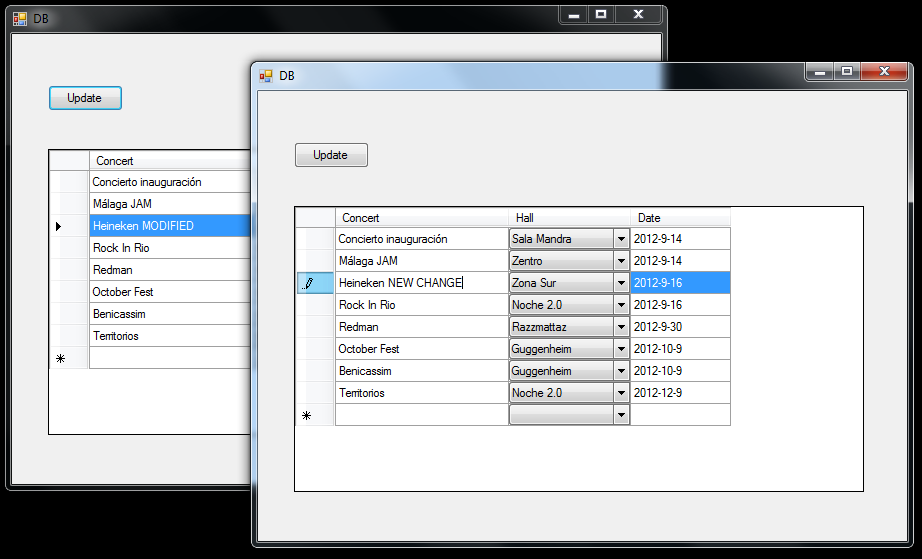
In this example we have the next application and data in a grid


The code for submit changes to the database when updated is the next

     
	private void btnUpdate_Click(object sender, EventArgs e)
    {
        commandBuilder = new SqlCommandBuilder(dataAdapterConcerts);
        dataAdapterConcerts.Update(dataSet.Tables["Concerts"]);
        dataSet.AcceptChanges();
    }


In order to stablish concurrence control, we are going to implement the event handler RowUpdated of our SqlDataAdapter object

    dataAdapterConcerts.RowUpdated += 
        new SqlRowUpdatedEventHandler(dataAdapter_RowUpdated);


with the next code

     
	private void dataAdapter_RowUpdated(object sender, SqlRowUpdatedEventArgs e)
    {
        if (e.Status == UpdateStatus.ErrorsOccurred)
        {
            solveConcurrence(e.Row);
            e.Status = UpdateStatus.SkipCurrentRow;
        }
    }


The method solveConcurrence for the row is as follows

     
private void solveConcurrence(DataRow row)
{
    DataSet actualData = new DataSet();
    dataAdapterConcerts.Fill(actualData, "Concerts");
    dataAdapterHalls.Fill(actualData, "Halls");

    actualData.Tables["Concerts"].PrimaryKey = new DataColumn[] 
        { actualData.Tables["Concerts"].Columns["IdConcert"] };

    DataRow actualRow = actualData.Tables["Concerts"].Rows.Find((int)row["IdConcert"]);

    string message = string.Format("actual value = title: {0} - id hall: {1} - date: {2}
       \r\rproposed value = title: {3} - id hall: {4} - date: {5}",
        actualRow["Title"], actualRow["IdHall"], actualRow["Date"], 
        row["Title"], row["IdHall"], row["Date"]);

    if ((MessageBox.Show("Concurrence conflict\r\rdo you want to override changes?\r\r" 
        + message, "Concerts#",
        MessageBoxButtons.YesNo, MessageBoxIcon.Question)
        == DialogResult.Yes))
    {
        dataSet.Merge(actualData, true);

        dataAdapterConcerts.Update(dataSet.Tables["Concerts"]);

        row.AcceptChanges();
    }
    else
    {
        row["IdConcert"] = actualRow["IdConcert"];
        row["Title"] = actualRow["Title"];
        row["IdHall"] = actualRow["IdHall"];
        row["Date"] = actualRow["Date"];

        row.AcceptChanges();
    }
}


The result of this code when we launch two or more instances of the application and apply different changes on the same row, is the next


Data will be merged or equalized depending on the dialog result


<METHOD SOFTWARE © 2013>